Windows 8 Start Screen Animation Registry Hack
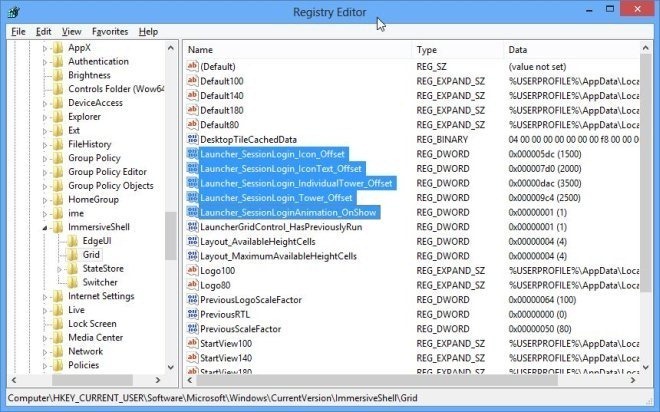
The start Screen in Windows 8 can be customized using the Personalization options included in the PC Settings. It allows you to choose a tattoo to be displayed on the Start Screen and select the main color for the Modern UI. When you open the Start Screen, it displays the tiles in a specific animation. Windows does not provide you with an easy way to change the speed or style of the animation, however, a simple registry tweak can be applied to enable and control the animation. Other than the tiles, this registry hack also work for the animations for User picture, Username, and the Start text (present at the left side of the Start Screen). In order to change the Start Screen animations, open the Windows Registry Editor and open the following registry key.
HKEY_CURRENT_USER\Software\Microsoft\Windows\CurrentVersion\ImmersiveShell\Grid
Now, right-click in the main window of the registry editor to create a new DWORD (32-bit) Value and rename it to Launcher_SessionLoginAnimation_OnShow. Once created, open the key and change the value to 1. Close the registry editor and open the Start Screen. You will notice that the hidden animation is enabled.
TKB:1027